

Google Opens Play Store Publishing to Vibe-Coded Apps
Google is making a major change to how Android apps reach users. The company says it will let anyone who creates an app through vibe coding distribute it through the Play Store using only a standard Google account. The move removes the immediate need for a paid developer account, at least for personal distribution. It is part of a broader set of updates that touch publishing, recommendations, gaming, and the way the Play Store appears across phones, cars, and extended reality devices.
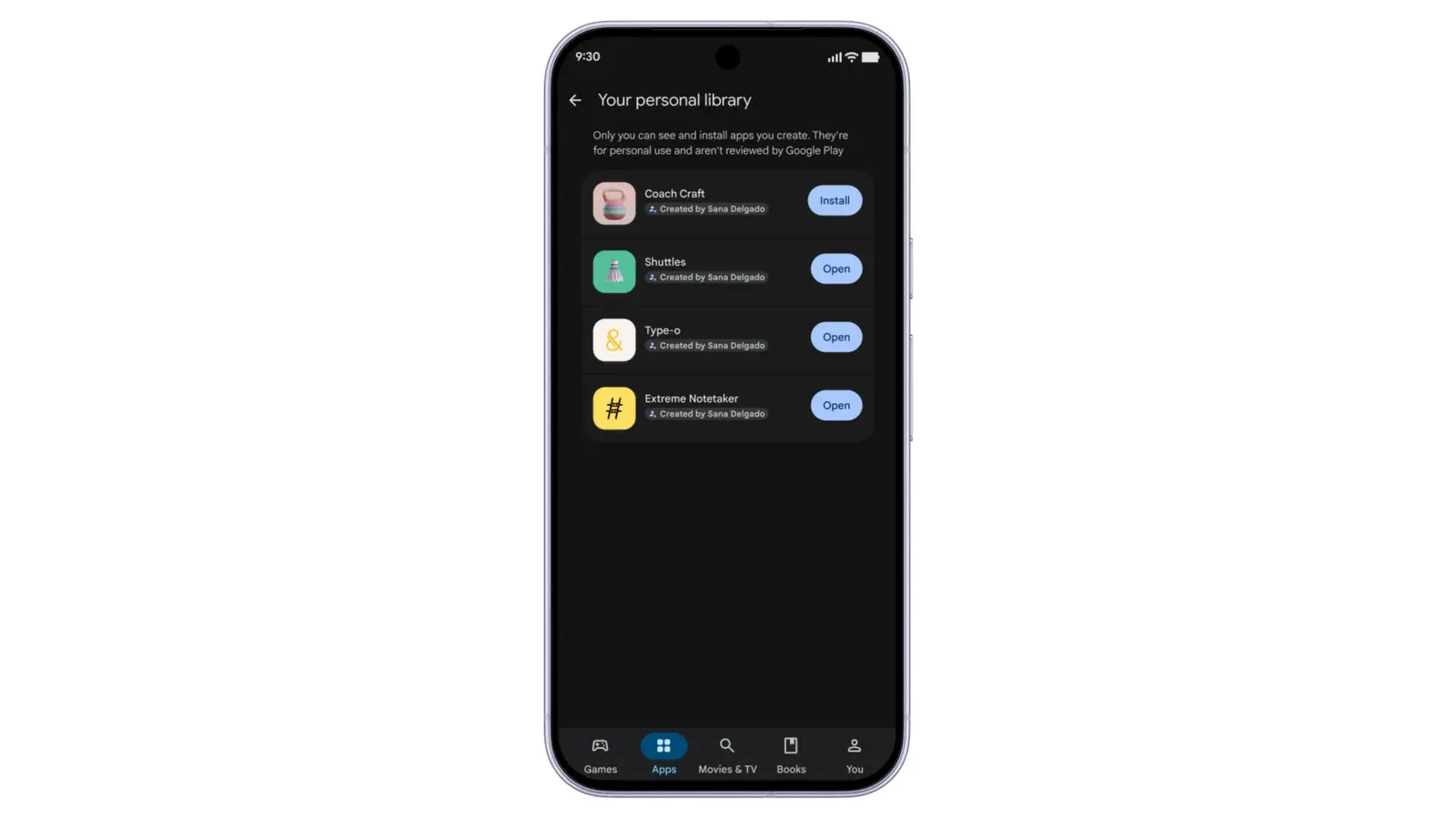
For years, Android users have been able to sideload APKs, but Google has made that process more complicated. The new publishing path is meant to be simpler. It starts with Google AI Studio, where users can generate app ideas with written prompts to Gemini. They can refine the results with more prompts or by editing the generated code directly. Instead of treating those apps as throwaway experiments, Google will let them live inside a personal library on the user's own devices. That includes tablets and computers with access to the Play Store.
The initial rollout is limited to users in the United States and select other markets who are 18 years and older. For those users, a Google account becomes enough to upload and distribute a vibe-coded Android app. The app does not immediately appear to the entire world. It stays available to the creator's own devices first. Google says it eventually plans to let people securely share these apps with friends and family. When a creator wants a global audience, they can graduate to a professional developer account and submit the app to the Play Store's normal safety reviews.
What the New Publishing Path Looks Like
The process Google describes is not just a shortcut around developer registration. It is a new tier of distribution that sits between sideloading and a full public release. The personal library gives creators a place to test, iterate, and use their own AI-generated apps without opening them to the wider ecosystem. That matters because AI-generated apps can be rough, experimental, or highly personal. A budgeting tool, a workout tracker, a simple game, or a household chore organizer might not be ready for millions of users, but it can still be useful to the person who made it.
Google's decision also acknowledges how quickly AI app generation has improved. AI Studio can turn a natural-language prompt into a working Android app. The creator can then adjust the app with follow-up prompts. If they know how to code, they can edit the generated source directly. This lowers the barrier to entry for people who have ideas but not years of Android development experience. It also creates a new class of app creators who may never have published anything before.
- Account requirement: A standard Google account, not necessarily a paid developer account, for the initial personal distribution path.
- Creation tool: Google AI Studio, where Gemini can generate Android apps from written prompts.
- Initial reach: A personal library available on the creator's own devices, including tablets and computers with Play Store access.
- Sharing: A planned secure sharing option for friends and family.
- Public release: An upgrade path to a professional developer account and standard Play Store safety reviews.
From Personal Library to Global Release
The graduation path is important. It gives Google a way to separate personal experimentation from public distribution. Apps that stay in a personal library do not need to meet the same bar as apps that are available to everyone. But if a creator wants to reach a global audience, they must move into the existing professional developer framework. That framework includes identity verification, policy compliance, and safety reviews. In practice, this could reduce the risk of low-quality or malicious AI-generated apps flooding the public store while still encouraging people to build.
Google has been under pressure to open the Play Store to competitors and to adapt to new AI workflows. This change could be one of the biggest because it alters who can publish and how easily they can do it. The Play Store has already changed significantly in recent years. Google has injected AI into search, recommendations, and device experiences. It has also faced legal and regulatory pressure to allow alternative app stores and payment systems. The new publishing option fits into that larger shift: the store is becoming less of a closed club for professional developers and more of a platform for AI-assisted creation.
Discovery Changes: Ask Play and Gemini
Publishing is only one part of the update. Google is also tweaking how people find apps. The company previously introduced Ask Play, a major discovery feature, at its developer conference. Now it is bringing similar capabilities to Gemini. The AI assistant will be able to surface direct links to Play Store apps inside chats. That means a conversation about planning a trip, learning a language, or tracking a fitness goal could end with a relevant app suggestion. Instead of leaving the chat to search the store manually, users can follow a link directly from Gemini.
Google is also expanding its sports topic pages in the Play Store. These pages appear during live matches and will now cover more soccer games, including Premier League and Major League Soccer matches. The goal is to meet users at the moment when they are most engaged. If someone is watching a match, the Play Store can highlight related apps, games, or experiences. For cars with Google built-in and Android XR, Google is updating the Play Store layout so it fits the size of the physical or virtual screen. That includes dashboard displays and headset interfaces, where traditional phone layouts may not work well.
Game Finder, Gamer DNA, and Playlists
For people who mainly use the Play Store to find games, Google is introducing Game Finder. The feature recommends games based on a new taste profile called Gamer DNA. Users can fine-tune this profile with their preferences and favorite genres. During a press roundtable, Google suggested it wants the filters and genre tags to become increasingly granular. That could eventually let users search for games that specifically offer controller support, for example. The idea is to move beyond broad categories like puzzle or action and toward recommendations that match very specific playing habits.
Google is also adding game playlists. This feature lets users recommend a collection of mobile games for other people to try. A playlist could be a curated set of relaxing games, competitive shooters, or local multiplayer titles. It turns discovery into a social activity, where players can share their taste with friends or the wider community. Combined with Game Finder and Gamer DNA, the Play Store is trying to become more personalized and more community-driven at the same time.
Sidekick Clips and New Developer Engagement Tools
Google is updating the overall experience of playing games on Android as well. The Sidekick overlay is getting a new feature that can record 30-second clips of gameplay. Those clips can be shared, saved, or used to highlight memorable moments. For players, it is a lightweight capture tool that does not require extra software. For developers, it is another way to generate user-created content around their games.
Developers are also receiving a collection of new tools designed to increase engagement. These include Sprints, Community Posts, and an expansion of Quests. Sprints are 48-hour in-game challenges that match players of a similar skill level. The goal is to compete for the highest score within a short window. Quests previously allowed developers to reward players with Play Points. Now Quests can also provide in-game rewards. Community Posts adds a Q&A section to store pages, so players can ask and answer questions about games directly in the Play Store.
Why This Matters for Developers and Users
The helpfulness of these features depends heavily on how much users trust AI to build apps and recommend content. AI-generated apps can be inconsistent, and recommendations can feel generic if the underlying profile is not accurate. But the direction is clear. Google is trying to keep pace with third-party app stores that can now be installed through the Play Store. It is also trying to make the Play Store more responsive to how people actually create and discover software in an AI-first era.
For new creators, the biggest change is psychological as much as technical. A paid developer account and a public safety review can be intimidating. A personal library with a standard Google account lowers the first step. It lets someone build an app for themselves, use it, improve it, and only later decide whether it should be shared or published globally. That could lead to more experimentation and more diverse apps. It could also lead to more clutter, which is why the graduation path and safety reviews matter.
For users, the update could make the Play Store more conversational. Gemini links, sports pages, and Game Finder all try to bring apps into moments of intent. Instead of browsing endlessly, users may ask a question, watch a match, or describe their taste and receive a relevant suggestion. Whether that feels helpful or intrusive will depend on execution. But Google is betting that AI can make discovery feel less like searching a catalog and more like asking a knowledgeable friend.
Source: Engadget News